Changelog

New features, improvements and fixes in BenchApp.

Mentions, and a faster Chatter

This release is all about Chatter: mentions, conversations that feel faster, quicker ways to react and catch up, and an easier way to find the chat you're looking for.
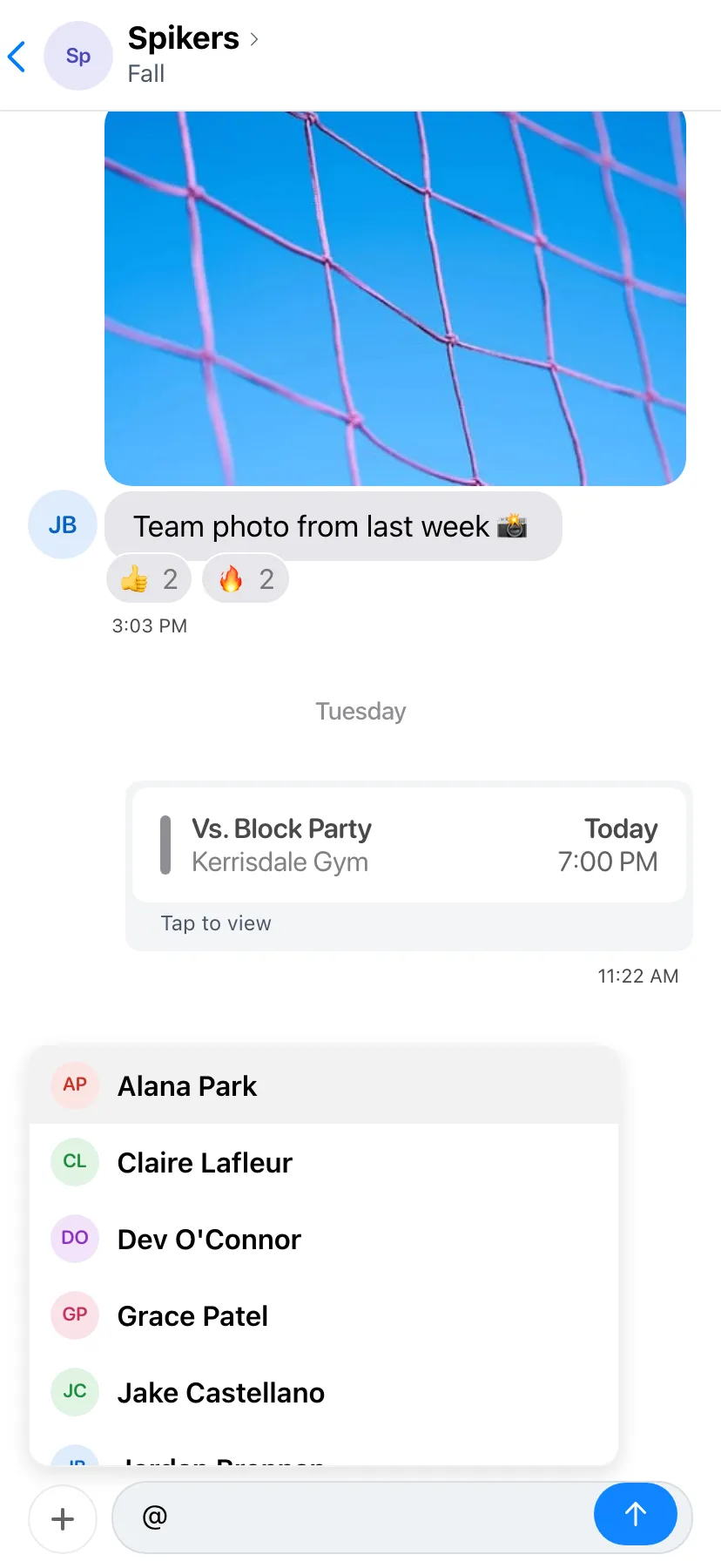

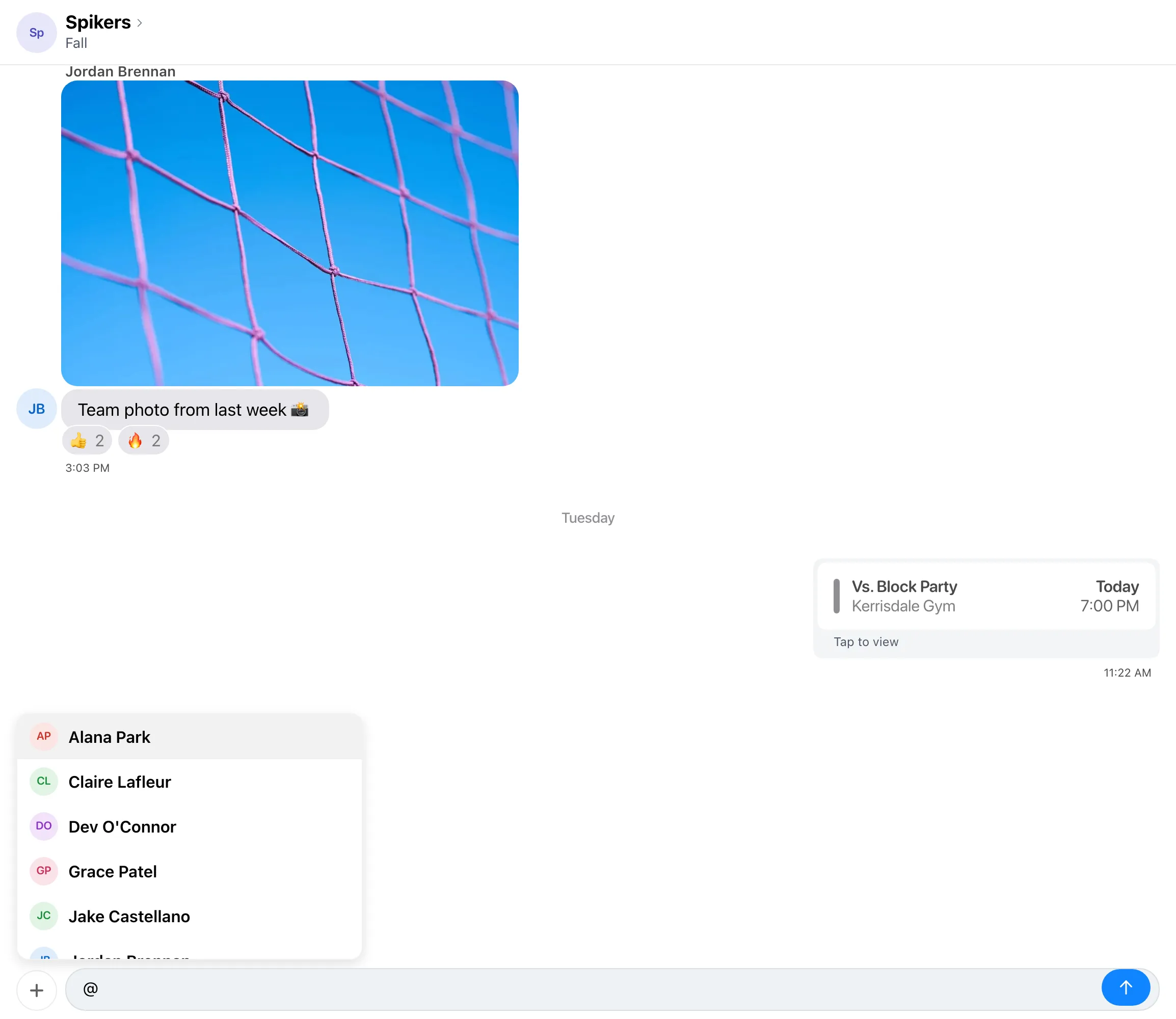
Spikers team chat with "@" typed in the message box and the mention picker open, listing team members such as Alana Park, Claire Lafleur, Dev O'Connor, Grace Patel and Jake Castellano.

Mentions

Type @ in any chat and pick a name from the list. They'll get a notification, and their name stands out in your message.

When someone mentions you, you'll see an @ next to that chat until you've read it.

Smoother Chatter

Scrolling through long chats is now smoother, and new messages glide in as they arrive.

The message box stays with your keyboard as it opens and closes, and the date shows at the top while you scroll back, so you always know where you are.

Double-Tap to React

Double-tap a message to add a πŸ‘ reaction without opening the menu. Double-tap it again to take the reaction back.

Press and hold a message for the full set of reactions, reply, copy and the other options.

Jump to Latest

When you scroll back through a chat, an arrow button appears near the message box. Tap it to jump straight to the newest message.

If new messages arrive while you're reading older ones, the button shows how many you haven't seen yet.

Chat Filters

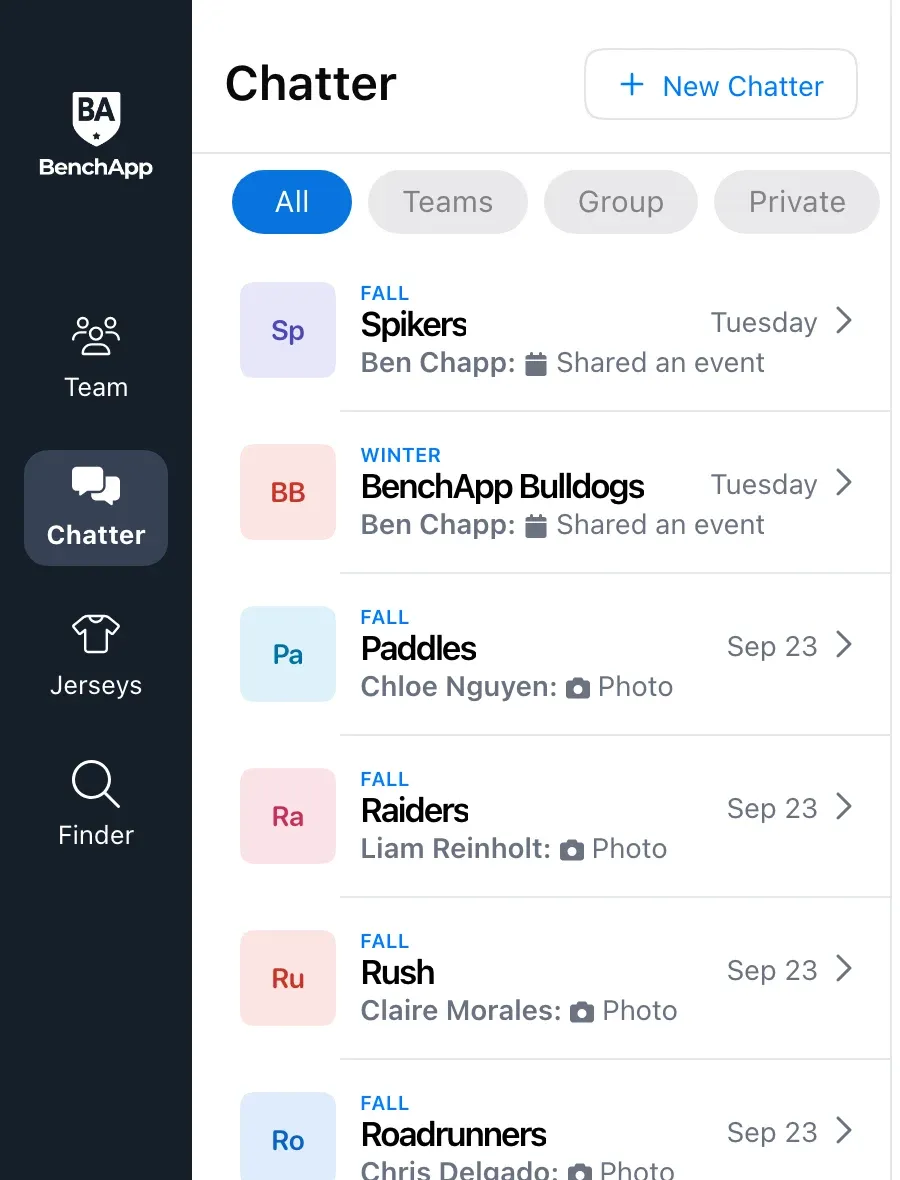
The Chatter chat list now has tabs along the top: All, Teams, Group, Private and Archived. Tap a tab or swipe between them to narrow the list.

Archived chats have their own tab, so they stay out of the way until you need them.

Share Games to Chatter

Managers can share a game to the team chat from the game's details. It shows up as a game card in the chat.

Anyone in the chat can tap the card to open the game's details.

Improvements

  • The person who started a group chat can remove people from it.
  • Scroll up in a chat to see its whole history, not just the latest messages.
  • League admins pick which extra hockey penalty lengths scorekeepers can use.
  • Notification History shows the newest first, and who sent each one.
  • Media now sits in the team menu, right after Drinks.
  • League menus have one Settings item instead of four.
  • When you RSVP for your family, your kids are listed first.
  • League schedule imports match your existing teams and check before adding new ones.
  • Players without a team can open Find a Game and Account right away.

Fixes

  • Calendar sync leaves games that are already over alone.
  • Opening a game from a notification or link no longer gets the Schedule tab stuck.
  • Invite Spares only picks spares who can get the invite the way you're sending it.
  • Chats show everyone in them again, without extra spaces in names.
  • Switching Chatter tabs keeps your keyboard open.
  • Deleting a message asks first, so you can back out.
  • Long attendance lists load every player as you scroll.
Tidy up your group chats

Whoever starts a group chat can now manage who's in it, plus a handful of fixes for chats and spare invites.

Remove People From a Group Chat

Open the group chat's details and remove anyone who no longer needs to be there. Only the person who started the chat can do it.

Fixes

  • Team and group chats list everyone in them again, so @mentions can find every teammate.
  • Importing players into Invite Spares works again.
  • The Go to Schedule button after a schedule import is easy to read again.

@mentions in Chatter

Get a teammate's attention with an @mention, scroll back through a chat's whole history, and give league scorekeepers the penalty lengths your league uses.

Spikers team chat in BenchApp Chatter with "@" typed in the message box and a "Mention a member" picker open above it, listing teammates Alana Park, Claire Lafleur, Dev O'Connor, Grace Patel and Jake Castellano.

Mentions

Type @ in any chat and pick a name. Their name stands out in your message, and they get a notification.

Chats where someone mentioned you show an @ until you've read them.

Your Whole Chat History

Older messages keep loading as you scroll up, all the way back to the start of the chat.

Penalty Lengths for Hockey Leagues

League admins can turn on extra penalty lengths, from 1 minute up to 25, so scorekeepers only see the ones your league uses.

Improvements

  • The league menu has one Settings item.
  • Long team names fit on the home and away tabs in league games.

Fixes

  • Deleting a message asks first, so you can back out.
  • Reaction counts are right, and messages sent while the app was catching up all arrive.
  • Opening a game from a link or notification no longer gets the Schedule tab stuck.

Chat filters and game sharing

Find the chat you want faster, drop a game straight into the team chat, and run league scorekeeping your way.

The Chatter list with All, Teams, Group and Private tabs

Chat Filters

Tabs along the top of the chat list narrow it to just your teams, group chats or private messages.

Archived chats get their own tab, out of the way until you need them.

Share Games to Chatter

Managers can share a game to the team chat, where it shows up as a card anyone can tap to open.

Scorekeeping Your League's Way

League admins choose whether teams can enter their own scores and stats, from the new General section in league settings.

Baseball and softball games can track penalties, and every sport picks from its own list of penalties.

Improvements

  • Double-tap a message to give it a πŸ‘.
  • A jump-to-latest button shows how many new messages you've missed.
  • Notification History shows the newest first, and who sent each one.
  • When a parent RSVPs, their child is picked first.
  • Managers using an AI assistant can see player rankings and set lines.

Fixes

  • Synced calendars keep games at your team's local time and leave finished games alone.
  • League schedule imports recognize your existing teams.
  • Basketball league leaders show basketball stats.
  • Printing lines and game sheets works in Safari.

A quicker + menu in Chatter

Sharing in Chatter takes fewer taps, group chats get their own photo, and players can see what they owe right on the attendance list.

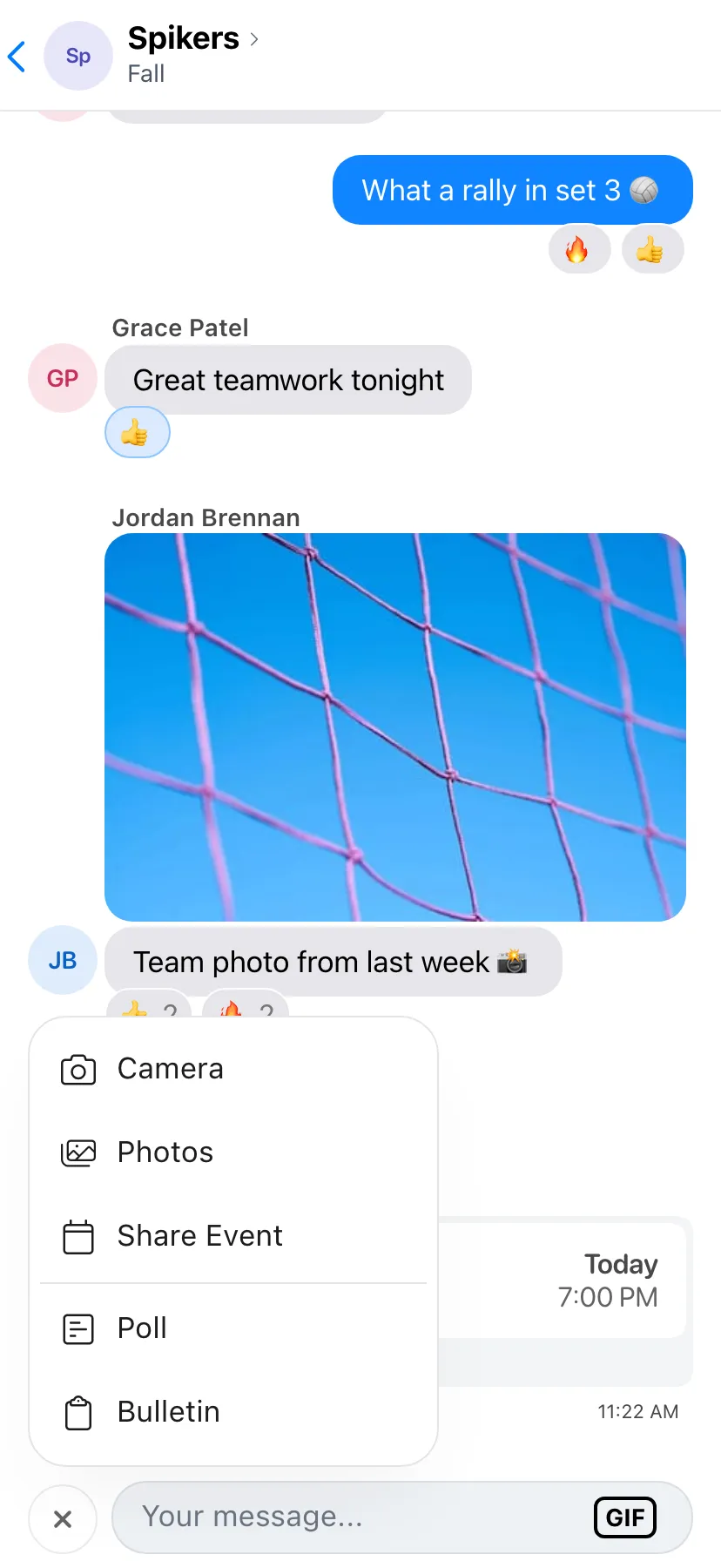
Spikers team chat with the + menu open above the message box, listing Camera, Photos, Share Event, Poll and Bulletin.

The + Menu

Tap + next to the message box to take a photo, pick one from your library, or share an event from your schedule.

Managers also get Poll and Bulletin in the same menu.

Group Chat Photos

Tap Edit on a group chat's photo to pick a new one, take one with your camera, or remove it.

Pay From Attendance

Players who still owe for a game have a Pay button next to their name on the attendance list, so it's easy to settle up before the game.

Improvements

  • Events shared in Chatter show up as cards with the latest details.
  • Ride requests open full screen.
  • Sort sits right next to the attendance heading.

Fixes

  • Quick Score's number pad no longer covers the scores, and tapping outside keeps what you typed.
  • Waivers show their text again.
  • The Chatter message box stays clear of the home bar on iPhone and responds every time on Android.
  • Poll votes stay right after a change or a reconnect.
  • Too many sign-in attempts tells you how long to wait.
  • The drinks count can't go below zero.

BenchApp in your AI assistant

Managers of PRO teams can now run their team from Claude, ChatGPT or Grok: ask about the schedule and attendance, invite spares, and add box scores, all in plain English.

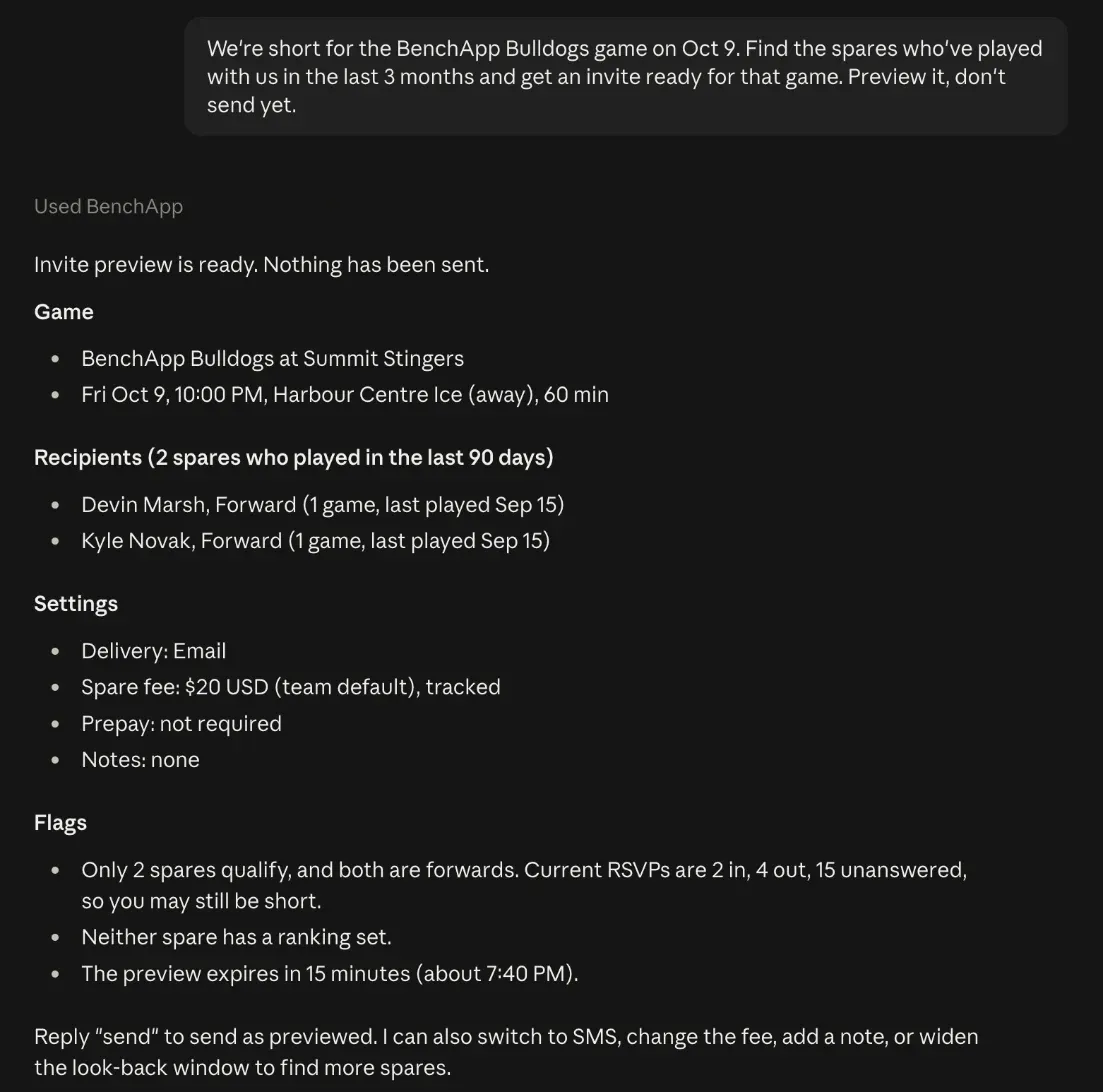
An AI assistant preparing a spare invite with BenchApp

Ask Your AI Assistant

Ask who's coming to Thursday's game, who still owes, or how your top scorer is doing, and get answers straight from your team.

Invite spares or add a hockey box score from a screenshot. You see exactly what will change before anything is saved or sent.

Included with PRO. League teams get it with League PRO.

Add and Edit Players

Paste a list of players with their phone numbers and birthdays, and your assistant adds them all.

Change names, jersey numbers, positions and roster types in one go.

Import Your Schedule

Share a schedule in any format, check the games it found, and they're on your team's calendar.

Improvements

  • Share an event in Chatter as a card that opens its details.
  • Players see a Pay button next to their name when they owe for a game.
  • Sign-in tells you how long to wait after too many attempts.

Fixes

  • Poll votes in Chatter stay right when a vote changes quickly.
  • Shared links in the chat list are labelled correctly and show a preview.

Every stat on the roster

See every stat for your sport right on the roster, fix a stat with a tap, and open bulletins straight from Chatter.

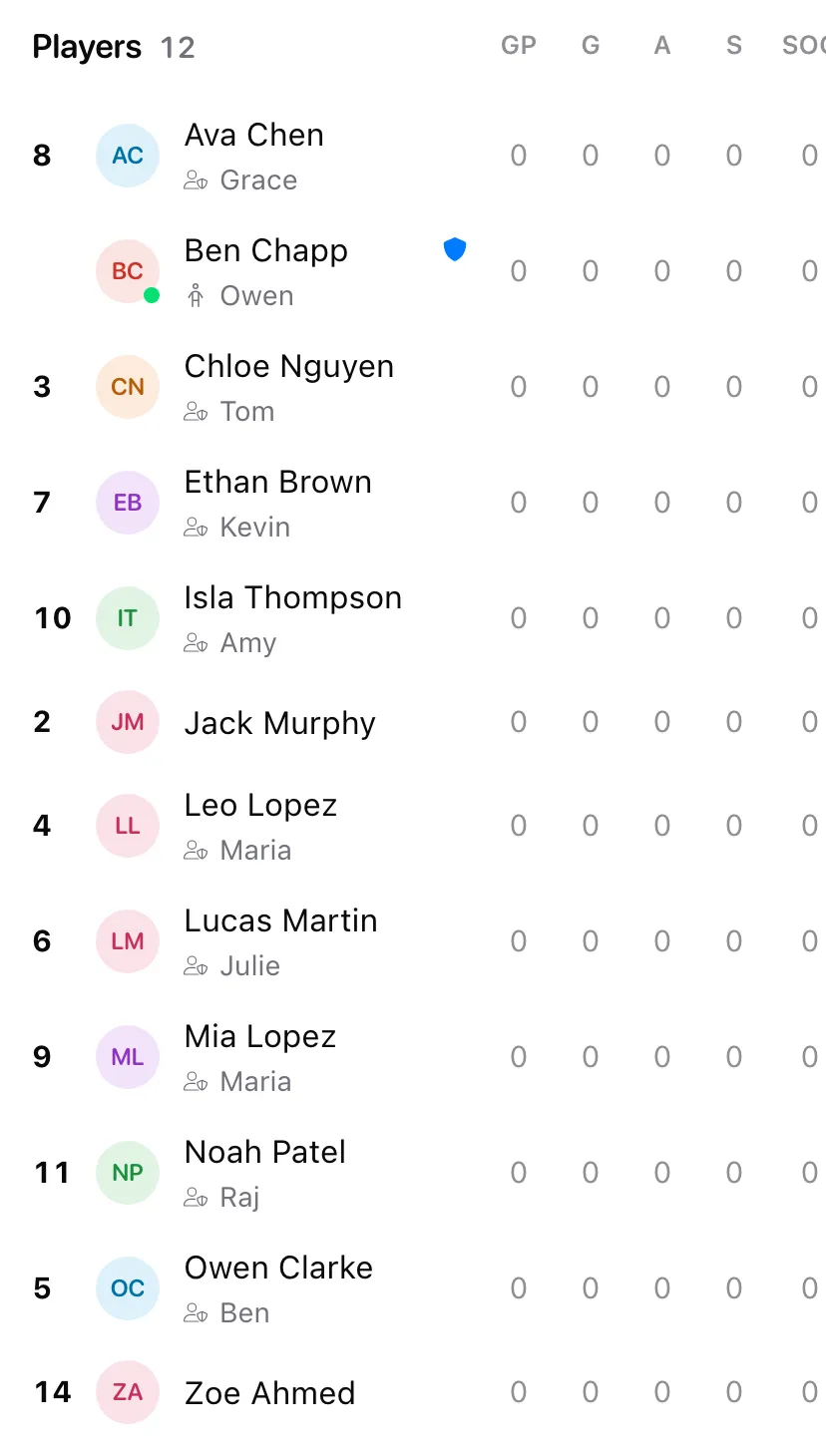
A team roster on a phone, with stat columns for each player: games played, goals, assists, shots and shots on goal.

Every Stat on the Roster

On your phone, slide the stats sideways to see them all. Player names stay put on the left so you never lose your place.

Adjust Stats With a Tap

Missed a goal or an assist? Tap the number on the roster and fix it on the spot.

Bulletins From Chatter

Bulletins shared in a chat open with one tap, and links inside them work.

New League Registration

League registration pages match the rest of BenchApp and explain clearly when something goes wrong.

Improvements

  • Group chats have an Edit button on their photo.
  • Personnel has its own spot in the league menu.
  • Finder games show the skill level at a glance.
  • League schedule imports create any new divisions in the file.

Fixes

  • Quick Score keeps team names and scores exactly as entered.
  • Moving players between league teams updates both rosters.
  • Marking a player Injured shows on their games right away.
  • Birthdays no longer shift by a day when saved.
  • Printed lineups fit the page in Safari.

Quick Score you can trust

A round of fixes for game day: scores save the way you entered them, and the schedule always shows the team you picked.

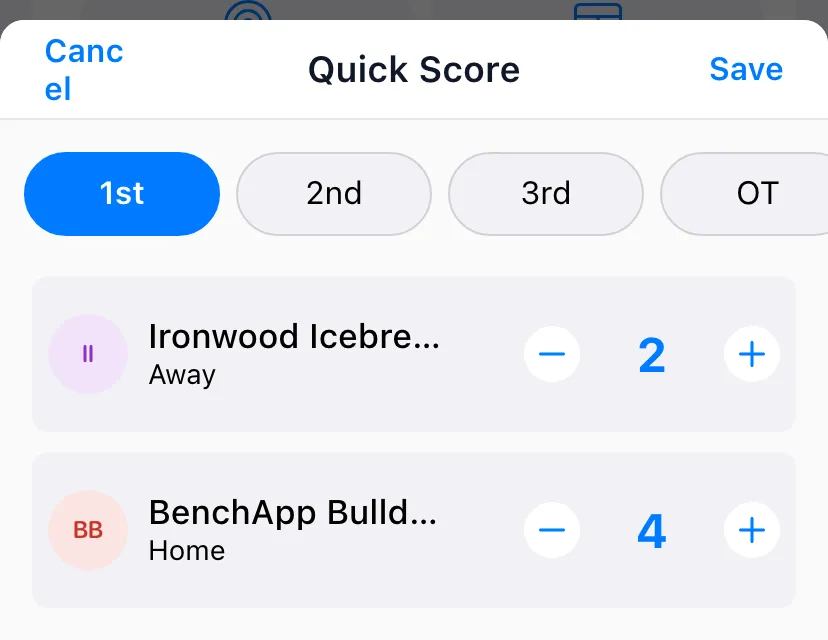
Quick Score sheet open over a finished game's details: Ironwood Icebreakers (Away) at 2 and BenchApp Bulldogs (Home) at 4, each with minus and plus buttons, period chips along the top, and Cancel and Save in the header.

Quick Score Fixes

Saving a Quick Score no longer renames teams to "To Be Determined" or resets past scores to 0–0.

On Android, the Cancel and Save buttons are back.

Improvements

  • On Android, Record Payment asks how someone paid right after the amount, with a clearer Done button.

Fixes

  • Move Players only offers players on the roster, and tells you if anyone couldn't be moved.
  • Marking a player Injured shows on their games right away.
  • Switching team, league or season always shows the right schedule.
  • The last game card on Home no longer hides under the tab bar.

Complete league leaderboards

League leaderboards show every player, bulletins are easier to read, and choosing who gets a message works the way you'd expect.

Every Player on the Leaderboard

Leaderboards keep going past the first 25 players, and an empty one tells you why: no stats yet, or nobody matches your search.

Easier-to-Read Bulletins

Bulletins are easier on the eyes, and it's easy to see who has read them.

Fixes

  • Select All works when choosing who gets a broadcast, a spare invite, a duty or a fee.

Spares from every team, in one list

Pick spares from all your teams at once, change a league season's dates, and a big batch of improvements for managers and leagues.

Spares From All Your Teams

Adding spares to an invite shows the players from each of your teams on one screen, so you pick everyone at once.

Change a League Season's Dates

When the league schedule shifts, change when the season starts and ends.

Are You a Parent?

Parents can set up their family so they can RSVP and get messages for their kids.

Search for Your Time Zone

Type a city to find your time zone instead of scrolling a long list.

Improvements

  • Print has its own button on the lineup.
  • Invite has its own button at the top of the roster.
  • Type a new opponent's name in the picker to add them.
  • Cancel and Remove sit at the bottom of an event's edit screen.
  • Chatter's quick reactions are back to the original set.
  • League admins can add players from a previous season and copy any team's invite link.
  • Schedule imports recognise your team's name and more league layouts.

Fixes

  • Archive Season works on phones.
  • Joining a team asks for a phone number when the team needs one.
  • Fee forms let you pick the event again.
  • Manager-only notes stay hidden when families edit their details.

Trial status for leagues

League dashboards show when a trial has ended, plus fixes for Android and dark mode.

Trial Status for Leagues

League admins can see at a glance that their trial is over.

Fixes

  • Messages on Android are no longer cut off.
  • Profile settings open on the web.
  • Banner buttons stay readable in dark mode.

New teams start in your time zone

New teams use your time zone from the start.

New Teams Start in Your Time Zone

When you create a team, it picks up your device's time zone, so game times are right from day one.

Improvements

  • PRO upgrades on Android continue on BenchApp.com.

Fixes

  • Vancouver's time zone shows the right offset.

Edit a league season's dates

League admins can change when a season starts and ends, and printing lineups and inviting people each get their own button.

Change a League Season's Dates

When the league schedule shifts, change when the season starts and ends.

Print Lineups in One Tap

No more digging through the More menu to print.

Invite From the Roster

Invite players straight from the roster's header.

Improvements

  • RSVP links meant for someone else ask you to switch accounts.
  • Games in progress show their start and end time.
  • There's a Home button at the top of the sidebar on phones.
  • Adding several events at once uses the iPhone calendar picker.

Fixes

  • Fee forms let you pick the event again.
  • Drinks duty updates after a skip.
  • League Broadcasts and Bulletins close when you tap Done.

Simpler player imports

Importing players to a team or a league uses the same simple screen as importing spares.

Simpler Player Imports

Team and league player imports use the same screen as importing spares, and only offer the roster types you can import.

Spares from every team, in one list

Pick spares from all your teams at once, and new tools for league admins.

Spares From All Your Teams

Adding spares to an invite shows the players from each of your teams on one screen, so you pick everyone at once.

Bring Back Last Season's Players

When a team carries over to a new season, add its players from last season instead of inviting them again.

Copy a Team's Invite Link

Share it with a captain or post it wherever your league talks.

Improvements

  • Archived seasons are listed newest first.
  • The opponent picker for league games groups teams by division.
  • Account shows App Store updates as well as quick updates.

Fixes

  • Joining a team asks for a phone number when the team needs one.
  • Archive Season works on phones.
  • Half-time player assignments stick.
  • You can pick your own team as home or away.

Parents on youth teams

Youth teams help parents get set up, schedule imports understand more layouts, and managers can cancel events from the bottom of the edit screen.

Are You a Parent?

Parents can set up their family so they can RSVP and get messages for their kids.

Better Schedule Imports

Schedule files from more leagues import cleanly, with game times in the right time zone.

Cancel or Remove an Event

They're easy to find, and well away from Save.

Improvements

  • Roster search is faster.
  • The fees page scrolls on iPad.

Fixes

  • Restoring an App Store purchase checks it first.
  • Manager-only notes stay hidden when families edit their details.
  • Box Score no longer stays open after you leave it.

Your favourite reactions are back

Chatter's quick reactions are back to the original set, plus fixes for All Teams.

Your Favourite Reactions Are Back

The reactions you see when you press and hold a message are the ones you're used to.

Fixes

  • All Teams shows the right attendance counts for each team.
  • All Teams subtitles stay readable.

Add an opponent from search

New opponents can be added right from the opponent picker.

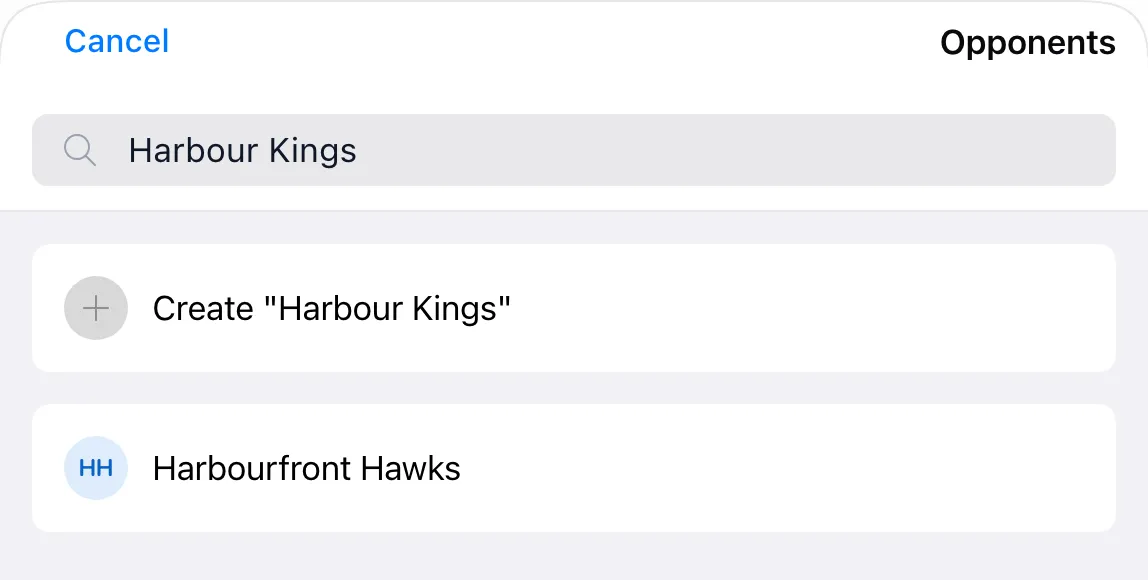
The Opponents picker for a new BenchApp Bulldogs game, with "Harbour Kings" typed in the search box. The top result offers Create "Harbour Kings" as a new opponent, and the existing opponent Harbourfront Hawks appears below it.

Add an Opponent From Search

If the team you're playing isn't in the list yet, add it straight from the search.

Search for your time zone

Pick your time zone from a searchable list.

Search for Your Time Zone

Type a city to find your time zone instead of scrolling a long list.

Improvements

  • Trial details only show for plans that include a trial.

Message box stays above the keyboard

The message box stays put above the keyboard, and Home and Broadcasts work with larger text.

Message Box Stays Above the Keyboard

The Chatter message box stays above the keyboard as it opens and closes.

Bigger Text on Home and Broadcasts

If you use a larger text size on your phone, Home and Broadcasts now make room for it.

Improvements

  • PRO trial prices are clearer on Android, and the trial is offered to the right teams.

Fixes

  • When your sign-in expires, the app takes you back to sign in instead of failing quietly.
  • Messages you send while offline all go out when you're back.
  • League leaders show scoring stats.

Bigger text on Home and Broadcasts

Home and Broadcasts work with larger text sizes, and league leaders show scoring stats.

Bigger Text on Home and Broadcasts

If you use a larger text size, Home and Broadcasts now make room for it.

Fixes

  • League leaders show scoring stats.

Back to sign-in when your session ends

An expired sign-in takes you straight back to the sign-in screen, and messages sent offline go out together.

Back to Sign-In When Your Session Ends

Instead of screens that quietly fail to load, the iPhone and Android app returns you to the sign-in screen so you can pick up where you left off.

Improvements

  • The PRO trial is offered to the right teams.

Fixes

  • Messages you send while offline all go out when you're back.
  • Dropdowns on iPhone keep their size.

Message box stays above the keyboard

On iPhone, what you're typing in Chatter is always in view.

Message Box Stays Above the Keyboard

The Chatter message box stays above the keyboard as it opens and closes.

Fixes

  • Pages with banners load properly on wide screens.

Search names with or without accents

Finding people is easier, the app tells you when an update is ready, and a round of fixes for rosters, RSVPs and Android.

Search Names With or Without Accents

Name searches ignore accents, so you find teammates however you type their name.

Know When an Update Is Ready

When an update has downloaded, the Account tab shows a badge and a row to restart into it.

Fixes

  • Drinks paid counts update after you change them.
  • If an RSVP doesn't go through, the app tells you.
  • Chatter's quick actions fit properly on Android.
  • Alerts on Android always have a button to close them.

Clearer PRO trial pricing

PRO trial prices are easier to understand on Android.

Clearer PRO Trial Pricing

The PRO upgrade screen on Android spells out the trial and what you'll pay after it.

Fixes

  • The menu drawer closes properly on wide screens.

App updates in Account

Account shows when a new version is ready, right under your profile.

App Updates in Account

On iPhone and Android, the update row sits under your profile, and Account scrolls as one page.

Fixes

  • Dropdowns open every time on Android.

Tidier Chatter on Android

Small fixes for Android.

Tidier Chatter on Android

The quick actions panel in a chat has the right spacing, and the bulletin button works.

Fixes

  • Alerts on Android always have a button to close them.

Search names with or without accents

Name search ignores accents, and the app tells you when an update is ready.

Search Names With or Without Accents

Name searches ignore accents, so you find teammates however you type their name.

Improvements

  • On iPhone and Android, Account shows when an update is ready, with a button to restart.
  • The sidebar's user menu opens on iPhone and Android, and its unread badge fits the count.

The all-new BenchApp

BenchApp is rebuilt from the ground up: one fast app for your team on iPhone, Android and the web, with Chatter, Finder and everything you use every week.

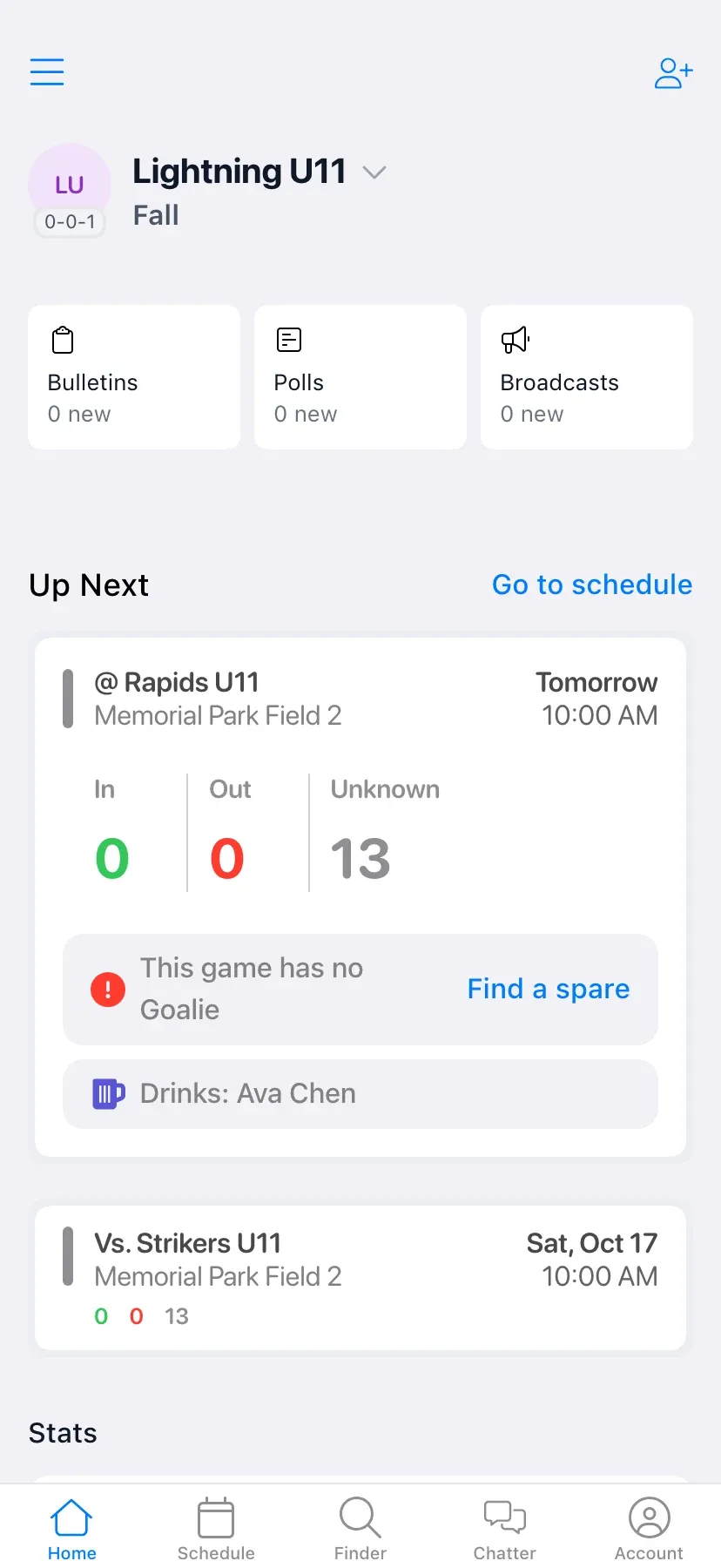
The BenchApp Home screen on iPhone

A Brand-New App

Schedules, RSVPs, Chatter, payments and stats all live in one new app that works the same way on iPhone, Android and the web.

On iPhone, it uses the new look of iOS, with glass buttons and native sheets.

Find a Game

Players say what they play, and teams post the games they need people for. Finder shows games and players near you on a map.

Updates Without the App Store

Most updates now download in the background, so you get fixes without waiting for an App Store or Google Play update.

Improvements

  • Quick Score has bigger, easier buttons on iPhone.
  • Players can edit their own profile from the roster.

RSVPs that tell you when they fail

A round of fixes for rosters, drinks and attendance.

RSVPs That Tell You When They Fail

When an RSVP or attendance change can't be saved, BenchApp says so instead of looking like it worked.

Fixes

  • Drinks paid counts update after you change them.
  • Long roster lists stop at the end instead of repeating.
  • League rosters finish loading after a hiccup.

Sign in with Google, Facebook or Apple on the web

The Google, Facebook and Apple sign-in buttons are back on the web, plus fixes for polls, dropdowns and drinks.

Sign In With Google, Facebook or Apple

The Google, Facebook and Apple buttons are back on the web sign-in and sign-up pages.

Fixes

  • The poll button in a chat opens the new poll form.
  • Dropdowns open reliably on Android.
  • Paid drink controls on the roster respond to taps.

Edit your own profile from the roster

Players can update their own details right from the team roster.

Edit Your Own Profile

Players can open their own profile from the roster and change their name, number and contact details.

Improvements

  • Advanced player options scroll on smaller screens.

Follow along with the RSS feed.